%%USERNAME%%    %%ACCWORDS%% %%ONOFF%% |


 |  Explanations and instructions of all things Writing.Com. |
 AwardIcons are a wonderful way to recognize someone for a great writing, a unique item, beautiful portfolio or a job well done! Each AwardIcon is given by a member of Writing.Com for whatever reason he or she so desires. This is the ultimate form of recognition here at Writing.Com!1 AwardIcons are a wonderful way to recognize someone for a great writing, a unique item, beautiful portfolio or a job well done! Each AwardIcon is given by a member of Writing.Com for whatever reason he or she so desires. This is the ultimate form of recognition here at Writing.Com!1What is an awardicon? AwardIcons are ribbons or trophies that may be awarded to items or portfolios within Writing.Com. Each AwardIcon is custom-designed by Writing.Com with varying levels of uniqueness and price. Award a virtual AwardIcon that is kept and displayed in the member's portfolio; mail a physical one to the member to keep and display at home! How do I give a virtual AwardIcon? To purchase an AwardIcon for a member's item, you have a few navigation options. If you are viewing the item, you can scroll to the bottom of it and purchase one directly from there. You can also choose Shop/AwardIcons or Points/  AwardIcons: Shop from the left navigation menu to go to: AwardIcons: Shop from the left navigation menu to go to:http://www.Writing.Com/main/awardicons.php Copy the item's ID number (for an item AwardIcon) or the member's username (for a portfolio AwardIcon), paste it into the Recipient Item ID or Username: text box in the order form at the bottom, and write a simple message to explain your reasons for awarding it. Make sure the recipient item ID number or the username is correct before confirming the AwardIcon. Notes:  If you want to put the AwardIcon on an item, do not include the username in the order form. If the AwardIcon you chose is not a trophy or wood plaque, do not fill out the AwardIcon Inscription for TROPHIES and WOOD PLAQUES: text box. If you want to put the AwardIcon on an item, do not include the username in the order form. If the AwardIcon you chose is not a trophy or wood plaque, do not fill out the AwardIcon Inscription for TROPHIES and WOOD PLAQUES: text box.After the AwardIcon is given, the member will receive a detailed notification email, the AwardIcon will be added to the item or portfolio, and displayed within his or her portfolio "Community" tab and Trophy Room, and, if qualified, will also added to his or her Community Recognition. Each qualified AwardIcon counts 1 point toward the recipient's Community Recognition. Qualified AwardIcon totals are calculated once per hour. The recipient's Community Recognition will be updated at that time. Each ribbon, plaque or trophy given will be permanently attached to the portfolio or item to which it was awarded and displayed beside the item's icon when shown in the portfolio, on public listings and within WritingML links. The default is for the highest valued AwardIcon most recently received to be displayed to the left of the item's cover icon at all times. If there is more than one AwardIcon for an item, the quantity received will be displayed as a small number over the bottom of the AwardIcon on display, such as:
To give an AwardIcon that qualifies for Community Recognition, the AwardIcon must be given at least 7 days from the time you gave that person a qualified AwardIcon before. On the confirmation screen for purchasing the AwardIcon, the system will alert you if you've sent the recipient an AwardIcon within the past 7 days. If you have, the AwardIcon(s) are shown so you can check the dates. Note: This is not a perfect solution. It is possible for the alert to be shown even though the AwardIcon would count for Community Recognition. The most recent AwardIcons are not necessarily the ones the 7 day CR requirement is based on. For example: Joe sent Sally an AwardIcon 15 days ago. Then Joe sent Sally an AwardIcon 5 days ago. The AwardIcon from 5 days ago does NOT count towards CR. Thus Joe could send Sally another AwardIcon today and it would count; however, the warning information would still be shown.     For a complete display of the AwardIcons currently in stock, please visit: http://www.Writing.Com/main/awardicons Want a custom designed Awardicon? "Commission a Custom Awardicon"  How do I send a physical AwardIcon? When you give a virtual AwardIcon, you also have the option to gift a physical AwardIcon that will be sent to the member by USPS First Class mail. The member will receive your gifted Awardicon in the form of a 1" button pin attached to a keepsake card (see photos below). The pins can be displayed as a collection or worn individually. The cards are standard sports-card size, so that they can be kept in a collection of sleeves. Each physical AwardIcon costs 32,500 "Gift Points" 2 each time you want to send one to another member.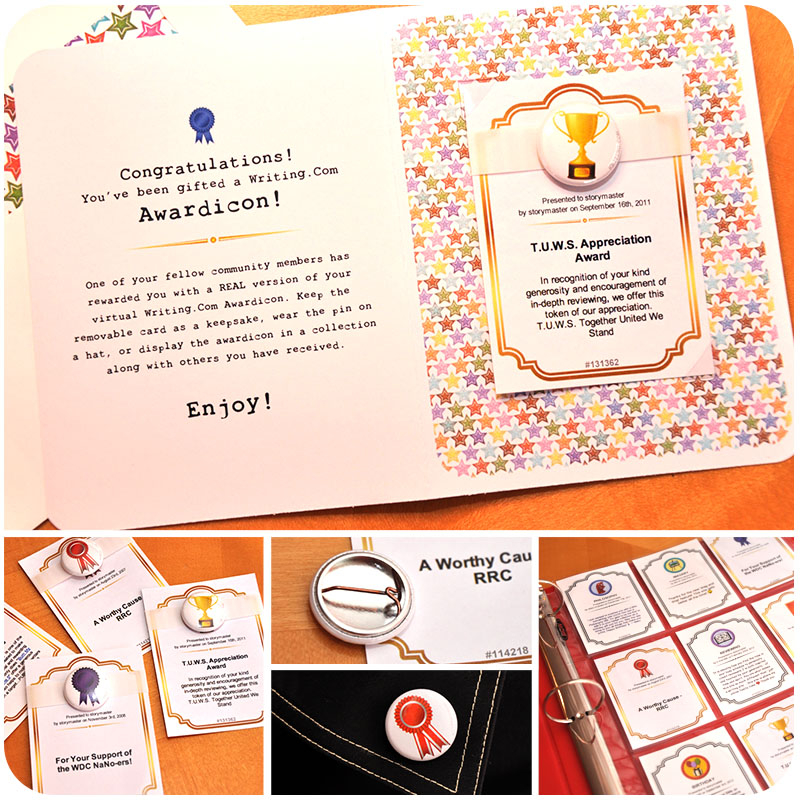 Click on the photo above to see examples of the physical AwardIcon. FREQUENTLY ASKED QUESTIONS Virtual AwardIcons What should I write in my message? Your message should leave an impression as to why you chose to award it. This can be anything from the item ID of the original contest where the award was won to a well-thought-out message about the item itself. I gave an AwardIcon, and later I noticed a typo in the title. How can I fix it? Click to view the AwardIcon, and then click on the Edit Award button displayed at the bottom of the lightbox. When you have adjusted the text, click the Continue to Confirmation Screen button to continue the edit process. When you are satisfied, click the Confirm this Award button. An email will be sent to the award's recipient informing them of the update, so please do try to limit the number of edits. If an order for this physical AwardIcon already exists, it may not reflect the changes of this edit, depending on where it is in our process. Do AwardIcons count toward my community recognition? Yes, qualified AwardIcons count toward a member's Community Recognition number. All AwardIcons are qualified except for those received from the same member within a 7 day period. As with merit badges, this helps ensure Community Recognition is based on a diverse cross section of Writing.Com members, and not just a few generous friends. (Because of the number of award opportunities offered by Writing.Com, AwardIcons from Staff are exempt from the 7 day exclusion. All AwardIcons sent from Staff are qualified.) How can I tell which AwardIcons I've received did not count for Community Recognition? In your own userlink, click your Community Recognition number next to your handle. In that pop-up window, click the link for List Non-Qualified Awards to see which ones missed out on being qualified and by how much time. While there's no way to change them from the past, it does alleviate the mystery. If an item has multiple AwardIcons, how are they displayed? By default, the highest valued AwardIcon most recently received will be displayed. As as example, let's say your item was awarded a blue ribbon valued at 10,000 GPs. The blue ribbon AwardIcon would be attached to that item. A week later, this same item wins a green ribbon valued at 10,000 GPs. Now the item will display the green ribbon since it is the highest valued AwardIcon most recently received. It will also have a small number "2" at the bottom of the AwardIcon, showing that your item has won two separate AwardIcons. Three weeks later, this item wins a red ribbon AwardIcon valued at 25,000 GPs. This red ribbon will be displayed on that item until another AwardIcon of equal or greater value is received. A few more examples are:
You can also override the default and choose the AwardIcon that will show at all times. Just click on an item's AwardIcons, page through them and choose one to set as the default. Click the Set Default button at the bottom of the display window. For items, this button is not shown on the current default AwardIcon. Can I give an AwardIcon to a member? Yes, you can award a member's portfolio with an AwardIcon. Just copy the author's username for the recipient text area when you choose the AwardIcon. Make sure it's their username and not their handle. The username can be copy/pasted from the right-click handle menu of a userlink. How can I view someone's AwardIcon? Clicking an item's AwardIcon will launch a small window containing its larger AwardIcon image, the name of the member who gave the AwardIcon and the reasons behind it. Trophies and plaques allow members to leave special, personal inscriptions for the item, while ribbons do not. If the item or portfolio has received multiple AwardIcons, you can page through them within the small window. How can I view my item's AwardIcons? Each Writing.Com item has an AwardIcon display case, where all awards received for that item will be stored. Each time the item receives an AwardIcon, it will automatically be added to the item's display case. When viewing an item, readers may click on the AwardIcon next to the title to peruse the item's display case. A small window will appear allowing the viewer to look through the AwardIcons from highest to lowest value. Where can I view all of my AwardIcons? Each Writing.Com author has a Trophy Room, where all display cases are stored. This means each item that has won an AwardIcon will be seen from this room. Members can access an author's Trophy Room from the author's portfolio Community tab if they meet the access requirements set for the tab by the member. For example: http://www.writing.com/main/profile/awardicons/storymistress My item is being published so I need to take the item private. How can I keep the AwardIcon for the private item from being visible to others? View the AwardIcon. At the bottom of the display window, click the Hide button. This will keep the AwardIcon from being shown to others in your Trophy Case and from being included in the Awarded Items listing. The AwardIcon will still be shown with your item in your Portfolio listing, according to the item's access restrictions. Hidden AwardIcons do not count for Community Recognition. An AwardIcon can be unhidden by clicking Show Award at the bottom of the AwardIcon's display window. Alternatively, from your Trophy Case, you can click on the hidden awardicon notice at the top of the page to open the list of hidden AwardIcons, click on the title of the AwardIcon to open its display window, and click the Show button at the bottom. On a page reload, the Trophy Case will hide or show that particular AwardIcon. Can I display AwardIcons in my signature? Yes, by using WritingML, you can quickly and easily add an AwardIcon (or more) to your signature. Please see WritingML Help for award. The award ID number is shown at the bottom of the AwardIcon display window. For limitations on displaying AwardIcons, see "Enhance Your Item With WritingML" .Can I download AwardIcons to store in my portfolio? No, you may not download the AwardIcons. Each AwardIcon is owned by Writing.Com and may not be used for personal use. There are many tools provided for displaying them without having to actually download or manipulate them in any way. Where can I view all of the AwardIcons that have been given out within the community? In the left navigation menu, click on Community/  Awarded Items. This will display all of the AwardIcons that have been given to items within the community. You may also click here: Awarded Items. This will display all of the AwardIcons that have been given to items within the community. You may also click here: http://www.writing.com/main/list_items/type/awarded On this page, you can also view all the item AwardIcons given to a particular member by using the handle or username of the item owner in the search bar. There is no list or search for AwardIcons sent directly to an author's portfolio. Where can I view all of the AwardIcons that I have given out to other members? In the left navigation menu, click on Points/AwardIcons: Given. This will display all of the AwardIcons that you have given within the community. To see AwardIcons you have given to a particular member, use your handle or username in the search bar of their Trophy Room. Can I give myself an AwardIcon? No, AwardIcons may only be given to other members' items or portfolios. Can I request a new Awardicon design? Yes, you may commission (guarantee) new awardicons using "Commission a Custom Awardicon" ..What happens to an item AwardIcon if I delete the item? If an awarded item is deleted, the Community Recognition count received from the item's attached AwardIcon will still remain in effect, and the AwardIcon itself will be automatically moved to the owner's portfolio. If the AwardIcon for a deleted item has been hidden, it will be accessible via the hidden awardicons button at the top of the Trophy Case. Hidden AwardIcons do not count toward Community Recognition. If they are qualified, they will count toward Community Recognition once they are unhidden. Items in the Recycling Bin are just "hidden", not deleted. Hidden items that are not accessible to the community are NOT counted in Community Recognition. Once the item is purged from the Recycling Bin, the AwardIcon is automatically moved to the main portfolio. Thus a member's CR will decrease if an item is deleted and not purged before the next CR update. After the item is purged and the hourly CR update takes place, the member's CR will return. Physical AwardIcons Will my mailing address be made public to other members when they send me a physical AwardIcon? No, your mailing address will always be kept private and will only be used by the system to generate a mailing address when your physical AwardIcon is assembled and shipped. Only Writing.Com Staff will see this information. Can I order physical AwardIcons for ones I've already received? Yes! If you would like to order a physical AwardIcon for one that you've received, visit your AwardIcon area and click on the AwardIcon you want to order. From the window, click the Order AwardIcon button at the bottom. Can you ship a physical AwardIcon for a virtual one I've already given to someone? Yes! Visit your "Given" AwardIcon area and click on the one you want to order for the member. From that window, click the Order button at the bottom and we'll take care of the rest! Is there a bulk order option for Merit Badges and AwardIcons that I've already received? If you are interested in ordering all of your previously-received Merit Badges and AwardIcons in bulk instead of individually (minimum 50), email The StoryMistress   to discuss the options. Since we would be assembling them all at the same time and shipping them to you as a package, we would offer them at a discount, dependent on how many you've received. to discuss the options. Since we would be assembling them all at the same time and shipping them to you as a package, we would offer them at a discount, dependent on how many you've received.How long will it take for the physical AwardIcon to arrive? Allow up to two weeks for assembly and delivery. USPS first class mail is generally 2-3 days for US domestic mail. International delivery varies based on location. Is there a different fee for US and international mailings? At this time, all orders are the same price, regardless of delivery location. Does a physical AwardIcon affect community recognition? No, a physical AwardIcon does not count toward community recognition at all. Can I send a physical AwardIcon without sending a virtual one? No, the physical is an extension of the virtual. What happens if the member doesn't have his or her mailing address in the account? When you order a physical AwardIcon for a member, the system will automatically email him or her to request a physical mailing address. Members have up to two weeks to supply their accounts with a current mailing address. After this time, if no address has been input, the system will refund your Gift Points and no physical AwardIcon will be mailed. I received an email that someone gifted me a physical AwardIcon, but it hasn't been delivered by USPS yet. Now what? To keep costs affordable for everyone, we mail physical AwardIcons by USPS First Class Mail. Since this method is inexpensive, it does not include tracking or delivery confirmation. Once your AwardIcon order leaves our hands, it is in the hands of the postal system. If you would like to reorder your AwardIcon, choose it from within your AwardIcon page and click the Reorder AwardIcon button at the bottom. I received a request for my address and I don't want to give it. How do I opt out of these? On your personal information page under Shipping Preference, choose the "No" option and members will not be able to send you a physical gift.A Few Thoughts About AwardIcons Just like "Costumicons" and "Merit Badges and Achievements" , AwardIcons are sponsorships that help support Writing.Com. If you have a "special" AwardIcon that you have given more than once, keep a running list of those items and their authors at the bottom of your "special" item. Perhaps your AwardIcon will be known throughout Writing.Com and coveted by all. Add some life to your contests by giving away an AwardIcon for each winning placement. Combine this with Gift Points and you've got instant cool prizes! AwardIcons are not supposed to be "under priced" because they would quickly appear on every item and lose their value. AwardIcons stay with an item forever. Once your item has received an award, it will keep this AwardIcon by its side as long as it's on Writing.Com. More than likely, items that receive an AwardIcon will stand out much more on an item listing page. Over time, they will probably stand out so much more that they are worth their "weight" in saved BidClick fees. AwardIcons give added exposure to the awarding author as well as to the awarded author. People will click on the ribbons, plaques and trophies to read any message and see who awarded it.* Awards given before January 2nd, 2024 are based on a 14 day period between awards, unless they were given during a special Community Recognition bonus event with a stated shorter time requirement between awards. Recommended Reading Footnotes |
 Log in to Leave Feedback Log in to Leave Feedback |
 View Portfolio
 Visit Notebook
 Send Gift Points
 Badges
 Send Email


 Community Newsfeed
 General Discussion
 Sponsored Items
 Book of Trinkets
 Static Items
 Books
Books Groups
 Interactive Stories
 Audio
Audio Campfire Creatives
 Community Notes
 Crossword Puzzles
 Documents
 Folders
 Images
 In & Outs
 Madlibs
 Photo Albums
 Polls
Polls Product Reviews
 Quizzes
 Survey Forms
 Web Pages
 Word Searches