%%USERNAME%%    %%ACCWORDS%% %%ONOFF%% |


 |  Announcements pertaining to Writing.Com! |
 |
Hello, Writing.Com Community! We're thrilled to announce a fantastic update to Community Recognition that makes it even easier to support and appreciate each other here on Writing.Com! Starting now, the waiting period between merit badges and awardicons contributing to your CR points has been halved from 14 days to just 7 days! This means more frequent opportunities to acknowledge your fellow writers... and of course to see your own CR score grow a little bit faster. Yes... You read that right: Your gifted badges and awards now add to the recipient's CR once per week! We understand that our community thrives on mutual support and the recognition you can each award one another. This update makes it quicker and easier to spread joy, encouragement and positivity throughout our writing family. So, go ahead and celebrate each other's successes more often in 2024! Send out those virtual goodies we all know and love... watch as all of our Community Recognition numbers continue to grow, reflecting the vibrant, supportive environment we all cherish here at Writing.Com. Keep writing, keep inspiring, and keep supporting one another! * Please note: This change is not retroactive. Badges/Awards given prior to January 2nd 2024 are still governed by the waiting period at the time they were given. |
 Writing.Com's After Christmas Sale! All Awardicons, Merit Badges and Trinkets are 25% off through Thursday night!  PLUS... PLUS... Badges and Awardicons Qualify for Community Recognition every 24 hours!   AND... AND... All physical, mailed badges and awardicons are 10% Off!  Need more Gift Points? They're on sale, too! Need more Gift Points? They're on sale, too! Remember: Your purchase supports Writing.Com and all that we do to make it rock!  https://www.Writing.Com/main/shop/cat/Gift_Points https://www.Writing.Com/main/shop/cat/Gift_Points  This event ends 3am WDC time (that's Eastern) This event ends 3am WDC time (that's Eastern) on Friday, December 29th, 2023. Time remaining: [Refresh to load countdown.] THANK YOU for your support! |
 Merry Christmas Writing.Com! Merry Christmas Writing.Com!  We've been working on a few gifts for our community...  New for Trinkets Community Recognition! New for Trinkets Community Recognition!Trinkets now award 1 Community Recognition point for every 100 trinkets collected. Please note that trinkets you've created and then collected yourself do not count towards your own CR.   Collection and Creation Organization! Collection and Creation Organization!Your trinket "Collected" and "Created" pages now have PAGING! Rather than entire lists on a single gigantic page, it's now 100 per page. Plus, your trinkets can now be sorted by Oldest First, Newest First, Name A-Z or Z-A or by Trinket Frame.  Trinket Leaderboards! Trinket Leaderboards! We've added new leaderboards for the top 100 collectors and creators of trinkets! These leaderboards are linked from the Book of Trinkets, which is found in the "Gift Points" navigation. A direct link to the Book of Trinkets has also been added to the Community drop down menu.  New Emoticons! New Emoticons! = {e:ticket} = {e:ticket} = {e:tickets} = {e:tickets} = {e:trinket} = {e:trinket}And to celebrate these updates, a new Christmas trinket for you!   ENJOY!   |
 Congratulations to the following three winners of "Good Deeds Get CASH!" Congratulations to the following three winners of "Good Deeds Get CASH!"  in November 2023! First ($50): Review of "Touched by the Light" in November 2023! First ($50): Review of "Touched by the Light"  by Tiggy-Cheers for House Martell by Tiggy-Cheers for House Martell   Second ($25): Review of "Bruce Man" by ~SilverMoon~ Second ($25): Review of "Bruce Man" by ~SilverMoon~  Third ($10): Invalid Review by Lornda~ House of Martell ~ Third ($10): Invalid Review by Lornda~ House of Martell ~  Thanks to all of our November reviewers... We appreciate your feedback!  ~~SM |
The following winners for the October 2023 running of "What a Character! : Official WDC Contest" were chosen from the 23 entries submitted. Each entry was judged based on the criteria provided below. Congratulations to the following three winners: First Place - "Romancing the Reaper " by 𝔹𝕝𝕦𝕖𝕪𝕖𝕫 First Place - "Romancing the Reaper " by 𝔹𝕝𝕦𝕖𝕪𝕖𝕫   Second Place - "Blood Sucker" by Damon Nomad Second Place - "Blood Sucker" by Damon Nomad   Third Place - "Eve And The Mummy " by Author Ed Anderson Third Place - "Eve And The Mummy " by Author Ed Anderson  Thank you to our pool of official contest judges, and to Jaeff | KBtW of the Free Folk  for continuing to keep Writing.Com's official site contests running smoothly! for continuing to keep Writing.Com's official site contests running smoothly! |
Congratulations to the following three winners of "Good Deeds Get CASH!" in October 2023! First ($50): Review of "Moving In, 1987" by Tileira Second ($25): Review of "Black Ice" by ~SilverMoon~ Third ($10): Review of "The Cycle of Sorrow" by Elisa the Bunny Stik  Thanks to all of our October reviewers... We appreciate your feedback! ~~SM |
The following winners for the September 2023 running of "Journey Through Genres: Official Contest" were chosen from the 14 entries submitted. Each entry was judged based on the criteria provided below. Congratulations to the following three winners: First Place - "Shady Rest " by Bobby Lou Stevenson Second Place - "Unprepared" by Cubby~Cheering House Florent!  Third Place - "Vapor Lock" by D. Reed Whittaker Third Place - "Vapor Lock" by D. Reed Whittaker Thank you to our pool of official contest judges, and to Jaeff | KBtW of the Free Folk for continuing to keep Writing.Com's official site contests running smoothly! |
 New... New...What I'm about to post below has been tested only by me. Ya'll are far better at finding ways to break things than me.  So be warned: It is new and bugs may exist.  If you find one, please report it to me. If you find one, please report it to me. Merit Badges in the shop, now have descriptions and genres! These are just intended to add some depth and interest to badges. With this change, the backend system for Merit Badges has been revamped... which opens the door for other additions to the system in the future. (I'm still filling in some of the "WDC" badges... There's a lot!) And ... with this change comes a really cool update for Group Merit Badges... Group leaders (level 15 only) can now edit parts of their group Merit Badges! Add a short description of the badge. Set up to 3 genres on your badge. Manage who can award your badge. Plus, find some badge stats!Head to your Group Badges from the newly refurbished group navigation: Psssst Lilith of House Martell  - don't miss it this time... - don't miss it this time...  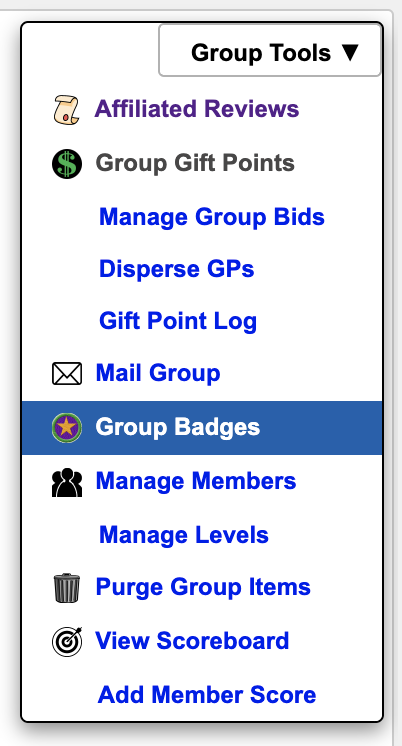 Look for the  icon on the badge, under the icon on the badge, under the  . .(BTW, the links to a search for that one badge.) Click the gear and you'll get a badge editing screen: 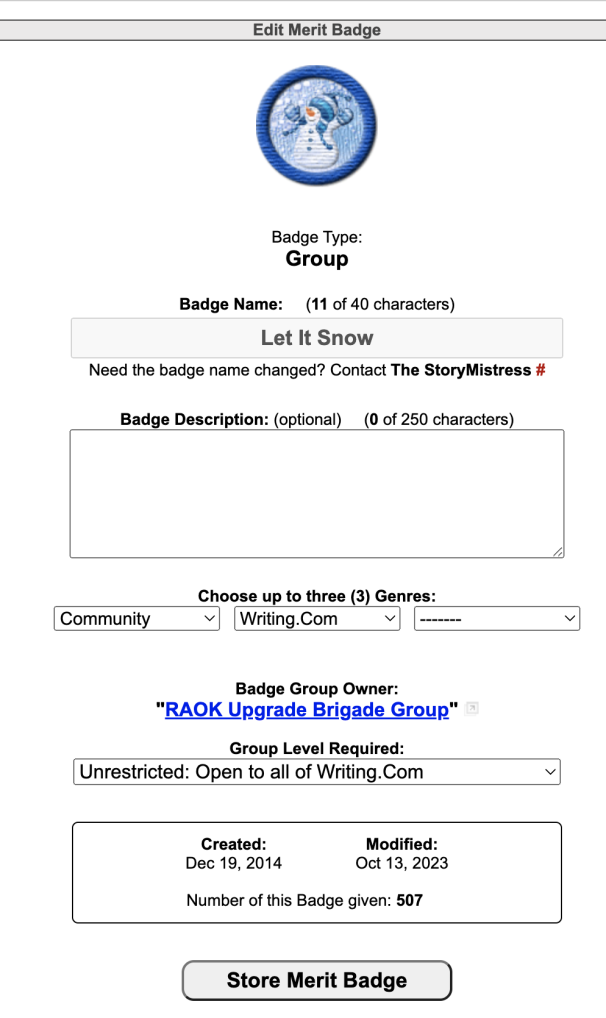 * As you can see, with this update, we now have the ability to change Merit Badge names... something that was very complicated in the past due to the system (or lack thereof). This should be used very sparingly and is intended only to correct typos, which sometimes happen with new badges. If you need a badge name changed or have been holding off requesting a correction, please contact myself or SMs. That's all for now... but more to come!  Enjoy! |
| The WritingML editor button bar now plays better with live preview on Newsfeed. ... and it's generally "smarter"!  For example, if you select text and click the center icon, it will immediately center in the preview. Before, you had to fiddle with it a little get the live preview update to happen. And now if you select some text and add a color, you can click different colors to change the text color and it just works, replacing the previous color with the new one... Before, the editor just continued to add and stack MORE colors, rather than replacing with the new.   And the same goes for changing font faces and font sizes. And the same goes for changing font faces and font sizes.Enjoy! |
Congratulations to the following three winners of "Good Deeds Get CASH!" in September 2023! First ($50): Review of "The Devil Went Down to Midtown" by Jaeramee of the Free Folk  Second ($25): Review of "That Haunting Love Story" by Max Griffin 🏳️🌈 Second ($25): Review of "That Haunting Love Story" by Max Griffin 🏳️🌈  Third ($10): Review of " A Wasted Life" by The Lone Crab Third ($10): Review of " A Wasted Life" by The Lone Crab Thanks to all of our September reviewers... We appreciate your feedback! ~~SM |
 View Portfolio
 Visit Notebook
 Send Gift Points
 Awards
 Badges
 Send Email


 Community Newsfeed
 General Discussion
 Static Items
 Books
Books Groups
 Interactive Stories
 Audio
Audio Campfire Creatives
 Community Notes
 Crossword Puzzles
 Documents
 Folders
 Images
 In & Outs
 Madlibs
 Photo Albums
 Polls
Polls Product Reviews
 Quizzes
 Survey Forms
 Web Pages
 Word Searches





